
Singleton Macro: Simplifying Singleton Pattern in Flutter™ and Dart™
Singleton Macro: Simplifying Singleton Pattern in Flutter™ and Dart™

Implementation Example
Implementation
Augment Code Example


Augment Code

Are you tired of manually implementing the Singleton pattern in Dart™? The Singleton Macro package comes to the rescue! It automates the process of transforming classes into singletons using Dart's macro system. Whether you're a seasoned developer or a beginner, this package can save you time and effort while ensuring clean and consistent code.

Key Features

  • Automatic Singleton Implementation: Eliminates the need to manually write boilerplate code for singletons.
  • Single Instance Assurance: Guarantees only one instance of the annotated class is created.
  • Simplified Usage: Reduces complexity in adopting the singleton pattern in Flutter™ and Dart™ projects.

Installation

To get started, add the Singleton Macro package to your project. Simply include the following in your pubspec.yaml file:

dependencies:
  singleton_macro: ^0.0.3-dev.1

Run flutter pub get to install the package.

Enable the Macro Experiment

Before running your project, ensure that Dart's macro system is enabled in your analysis configuration. Add the following in your analysis_options.yaml file:

analyzer:
  enable-experiment:
    - macros

This step is essential for the Singleton Macro package to function properly.

How to Use

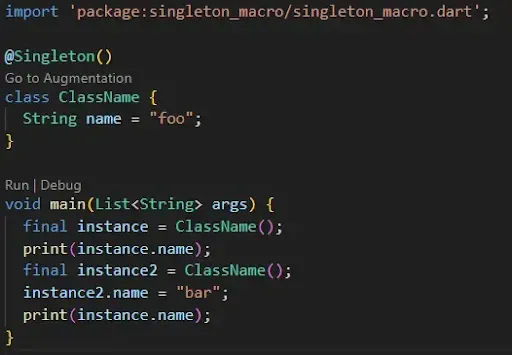
Using Singleton Macro is as easy as annotating your class with @Singleton. Here's an example:

// lib/main.dart
import 'package:singleton_macro/singleton_macro.dart';

@Singleton()
class MySingletonClass {
  String name = "foo";
}

void main() {
  final instance1 = MySingletonClass();
  print(instance1.name);  // Output: foo

  final instance2 = MySingletonClass();
  instance2.name = "bar";
  print(instance1.name);  // Output: bar

  print(identical(instance1, instance2));  // Output: true
}

Run the Code

To enable macros during runtime, use the following command:

dart --enable-experiment=macros run lib/main.dart
Why Singleton Macro?

Manually implementing the Singleton pattern can be error-prone and tedious. With Singleton Macro, you can:

  • Focus on your business logic rather than boilerplate code.
  • Reduce potential bugs related to incorrect singleton implementation.
  • Leverage Dart's powerful macro system to streamline your development process.

Conclusion

The Singleton Macro package is a game-changer for Flutter™ and Dart™ developers looking to simplify their workflow. By automating the singleton implementation, it ensures efficiency and consistency in your projects. Try it out today and see the difference!

Get the Package

Visit:  Singleton Macro page on pub.dev for more details and updates.

Comments

Popular posts from this blog

Flutter™ Installation Without Android Studio™

When developing with Flutter™, you typically install Android Studio™ as part of the setup process. However, if you want a lightweight alternative, you can install Flutter™ with only the Android command-line tools. This guide walks you through the steps to set up Flutter™ on Windows without Android Studio™. Step 1: Install Android Command-Line Tools Download Command-Line Tools: Download the Android SDK Command-Line Tools from the Android Developer website . Extract the downloaded zip file: Extract it to a directory, e.g., C:\Users\<User Name>\AppData\Local\Android\Sdk\cmdline-tools . Set up SDK directories: Inside the cmdline-tools folder, create a subfolder named latest . Move the extracted files and folders into this latest folder. The structure should look like: ...

Building a Modular Project with a Monorepo Using Pub Workspaces Feature

Flutter™  projects often start small, but as they scale, managing multiple packages becomes challenging. If you find yourself working with several modules or features in one project, organizing them efficiently is crucial. Enter Monorepos with Pub Workspaces – an excellent solution for managing a Flutter project with multiple packages in a modular way. In this post, we’ll explore how to structure a Flutter project in a modular way using a monorepo , and how to manage dependencies across various sub-projects without worrying about version conflicts. We’ll also look at how to configure Pub Workspaces to simplify dependency resolution and management. When working with Flutter™ and Dart™ , structuring a project in a modular way can improve scalability and maintainability. This is especially important when managing multiple packages in a single repository, also known as a monorepo . Pub Workspaces , introduced to simplify dependency management, provide a robust solution...

Stop Guessing: A Scalable Strategy for Flutter Environment Management

When building production-grade applications, hardcoding API endpoints, feature flags, or tracking keys directly into your source code is an architectural anti-pattern. To guarantee security and runtime predictability, setups should cleanly isolate target environments depending on compile-time parameters. This guide establishes a compile-time, zero-overhead environment orchestration system leveraging strict encapsulation patterns and modern features in native Dart. 1. Define the Immutable Flavor Domain ( flavor_enum.dart ) The foundation of this pattern relies on an explicit Flavor enumeration. This handles your application's environmental constraints and leverages a resilient static factory fallback to transform incoming build-time string tokens safely into type-safe domains. lib/flavor/flavor_enum.dart Dart /// flavor_enum.dart library; enum Flavor { development, ...